
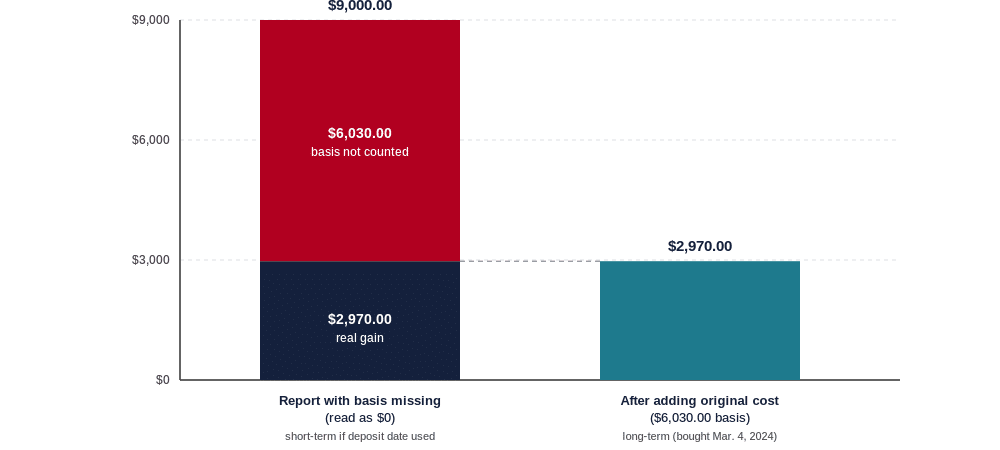
Your Coinbase tax report can look wrong because Coinbase often does not have your purchase records. For crypto you moved into Coinbase from another wallet or exchange, Coinbase’s help page says the cost basis shows as “Unknown” in Coinbase Taxes, and the form sent to the IRS leaves basis blank and marked “noncovered.” A blank basis is not a zero, but if nobody fills it in, a gain can look far bigger than it was. This guide covers why the gain/loss report can be off, how to add missing cost basis, how to export the raw transaction CSV, and one made-up lot worked from start to finish.
This page is general information, not tax advice. Talk to a qualified tax professional before you file. CryptoCashbackCard is an independent site, not affiliated with Coinbase, and this page has no affiliate or referral links. We did not test any account: we read Coinbase and IRS pages, and the worked example uses made-up numbers.
Last updated Nov. 16, 2026. US federal tax only. Tax year 2025 (filed in 2026) was the first year of Form 1099-DA, and Coinbase reported proceeds only. Tax year 2026 (filed in 2027) adds basis for “covered” assets only. Coinbase edits its help pages often; we read them on Nov. 16, 2026.
The short answer
- Where to find it: Coinbase Taxes, then Documents. IRS forms sit there; the gain/loss report and the raw transaction report are Coinbase-made custom reports, not IRS forms.
- Why it looks wrong: most often, crypto was moved in from elsewhere. Coinbase does not know what you paid, so basis shows as “Unknown,” and it uses your deposit date as the default for choosing lots.
- How to fix it: in Coinbase Taxes, open “Add transaction details,” pick the transfer under “Needs review,” and enter the date acquired and total cost basis including fees. That updates your dashboard and your copy of the 1099-DA, not the IRS copy. You still report your own basis on Form 8949.
- Cost-basis method: HIFO, LIFO or FIFO. A new choice applies to open and future trades, not completed ones.
- Form 8949: Coinbase stopped providing it from tax year 2025. You, a preparer or tax software produce it.
Coinbase tax information: the reports this page covers
For the overview of which IRS forms Coinbase sends and what is taxable, see our Coinbase taxes guide. This page is the deep dive on the reports and the CSV.
| Report | What it is | Where |
|---|---|---|
| Gain/loss report | Coinbase’s roundup of transactions that produced a gain or loss. It also lists DEX trades and Token Sales purchases, which are not on Coinbase’s IRS forms. | Taxes, Documents, custom reports |
| Raw transaction history | Your transaction history, for your own calculations or for tax software. | Taxes, Documents, custom reports |
| Account statements (CSV, PDF, HTML) | Monthly or custom statements for Coinbase.com and Coinbase Card, from the day the account was opened. | Settings, Accounts, Statements |
Coinbase Taxes covers Coinbase.com only, not Coinbase Wallet, Coinbase Pro or other exchanges. Coinbase Pro is closed; Coinbase says earlier Pro activity stays reachable in account statements until 2027.
Why is my Coinbase gain/loss report wrong?
“Wrong” usually means one of these causes. Check which fits your account.
| Cause | What the sources say | What to do |
|---|---|---|
| 1. Crypto moved in from another wallet or exchange | Coinbase does not know what you paid; basis shows as “Unknown.” Everything transferred in is noncovered, whenever you bought it. | Add the real date and cost (below), or track it yourself. |
| 2. Short-term vs long-term looks wrong | Coinbase uses the deposit date as the default for lot selection. | Use your actual purchase date. The holding period starts the day after you acquired it (IRS FAQ A50). |
| 3. Unexpected cost-basis method | A method you pick applies to open and future trades only. | Check Tax settings before you sell. |
| 4. Sent out, then back in | Coinbase assumes a send to an external address went to you and is not a sale. Units that come back are transfers in again, so likely “Unknown” basis (our reading: the IRS counts an asset as covered only if it stayed in the broker’s account from purchase to sale). | Keep a log of every transfer. |
| 5. Report totals differ from the 1099-DA | DEX trades and Token Sales purchases appear in the gain/loss report but are not on Coinbase’s IRS forms. | Reconcile by transaction, not by total. |
| 6. Activity missing | Coinbase Wallet, Pro and other platforms are not included. | Pull those records separately. |
| 7. Year cut-off | Coinbase uses Eastern Time for tax reporting. | Check trades near midnight ET on Dec. 31. |
Why does Coinbase show missing cost basis?
For crypto transferred in from a personal wallet or another exchange, Coinbase’s help page says “we do not know what you paid for it,” so basis shows as “Unknown.” The IRS rules follow the same line:
- Covered: bought on Coinbase on or after Jan. 1, 2026 and held there until sold. Coinbase reports basis and proceeds to the IRS.
- Noncovered: anything bought before Jan. 1, 2026, plus anything transferred in. Coinbase reports proceeds; the basis box is blank and marked noncovered.
- Tax year 2025: proceeds only, for every asset.
Blank is not $0. The IRS tells brokers to enter -0- “only if the digital asset sold actually had a basis of zero.” On your return, the Form 8949 instructions say to enter the correct basis in column (e) when no basis is shown on the 1099-DA. Leave it empty and the whole amount looks like profit. One older, undated Coinbase Learn page still says its estimates assume a $0 basis for crypto received from outside Coinbase; the current help page says “Unknown.” Open your own report to see which you get.
How to add missing cost basis in Coinbase Taxes
- Go to the Add transaction details page in your Tax Center.
- In the Needs review tab, select the transaction, then Add details.
- If the transfer holds more than one purchase, select Split this transfer and add one lot per purchase. Coinbase’s example: ten 0.1 BTC purchases moved in one transfer become ten lots.
- Enter the date acquired and your total cost basis, including fees, then Save. To change it later, use the Modified tab.
| What adding basis changes | What it does not change |
|---|---|
| Your Tax Center estimates, and the basis printed on your own Recipient Copy of the 1099-DA | The IRS copy: Coinbase says basis you add is classified noncovered, is not sent to the IRS, and only gross proceeds are reported. You still must calculate and report basis on Form 8949 and Schedule D. |
If your software’s basis differs from the 1099-DA, Coinbase says that “does not always mean something is wrong.” Coinbase has also built CoinTracker’s reconciliation tools into its app to fill in missing basis; CoinTracker plans cost extra (Coinbase blog, Feb. 10, 2026). You do not have to use it. If your old purchase records are gone, ask a tax professional what you can support.
Can I change my cost-basis method for past trades?
Not on Coinbase. Coinbase says that under IRS rules you choose your method before the trade settles, and a newly chosen method “can only be applied to open and future trades and will not be applied to your historical completed trades.” You can set HIFO, LIFO or FIFO on the Tax settings page or on the order preview screen. For transferred-in lots, the IRS lets brokers use the dates you provide “solely for lot-selection purposes and not for reporting basis or acquisition dates,” which is why the IRS copy stays blank even after you add your dates. Sources: Coinbase Help; IRS 1099-DA instructions, checked Nov. 16, 2026.
Self-transfers and gifts
- Sends to your own wallet: Coinbase assumes you still own the crypto, so the send is not a reportable sale. Only crypto sold or used to pay the network fee goes on the 1099-DA. The IRS agrees that moving crypto between your own wallets is not taxable, except for crypto used to pay the fee (FAQ A81).
- Gifts you received: no income until you sell; your basis is generally the giver’s, and your holding period includes theirs if you can document it (IRS FAQ A75-A77). Coinbase’s pages describe no gift setting, so keep the giver’s date and basis in your own records.
- Keep a transfer log: date, asset, amount, from and to. It is how you show a send went to your own wallet.
Does Coinbase send a 1099 to the IRS?
Yes. Coinbase sends Form 1099-DA to you and the IRS: proceeds only for tax year 2025, and proceeds plus basis for covered assets for tax year 2026, which Coinbase says it will provide no later than mid-February 2027. Income such as staking and USDC rewards goes on Form 1099-MISC at $2,000 or more for tax year 2026 (the threshold was $600 for 2025). Basis you add yourself is never sent to the IRS. You must report gains and income whether or not a form arrives (IRS FAQ A108). If a 1099-DA is wrong, the IRS says to ask the issuer for a correction; Coinbase says to contact support if your name, SSN or state is wrong. Sources: Coinbase Help: Form 1099-DA; Coinbase Help: Form 1099-MISC; IRS 1099-MISC instructions, checked Nov. 16, 2026.
How do I download my Coinbase transaction history CSV?
Route 1: Coinbase Taxes custom reports
- Go to Taxes. On a browser: profile icon, Settings, Accounts, Taxes. On mobile: main menu, Taxes, View documents.
- Download an existing custom report, or generate one: choose the report type and date range, then select Generate.
Route 2: Statements
- Go to Statements. On a browser: profile icon, Settings, Accounts, Statements. On mobile: main menu, Account & settings, Statements.
- Download a monthly statement as CSV (or HTML or PDF), or build a custom statement by Asset, Transaction type and Date, then select Generate.
Source: Coinbase Help: account statements and gain/loss reports, checked Nov. 16, 2026. We did not click through a live account.
The columns (third-party documentation, not Coinbase)
Coinbase’s help pages do not list the CSV columns. The headers below are the ones published by tax-import tools for current files. We do not know which route produces exactly this layout, and Coinbase has renamed columns before, so compare with your own file.
| Column | Notes from the tools |
|---|---|
| ID | Missing from some 2024 files |
| Timestamp | In UTC |
| Transaction Type | Buy, Sell, Convert, Send, Receive and others |
| Asset; Quantity Transacted | |
| Price Currency; Price at Transaction | 2023 files said “Spot Price Currency” and “Spot Price at Transaction” |
| Subtotal; Total (inclusive of fees and/or spread); Fees and/or Spread | |
| Notes | For a Convert, the coin you received may appear only here |
- Work in a copy. Some files start with a few title lines above the header row; delete them in the copy only.
- Filter by Transaction Type before you add anything up: buys, sells, converts, sends and receives are mixed together.
- “Receive” rows are your missing-basis candidates. Match each to your purchase records.
- Proceeds on Form 8949 must match the 1099-DA, not this file.
A worked example: one lot with missing basis (illustrative, not a real account)
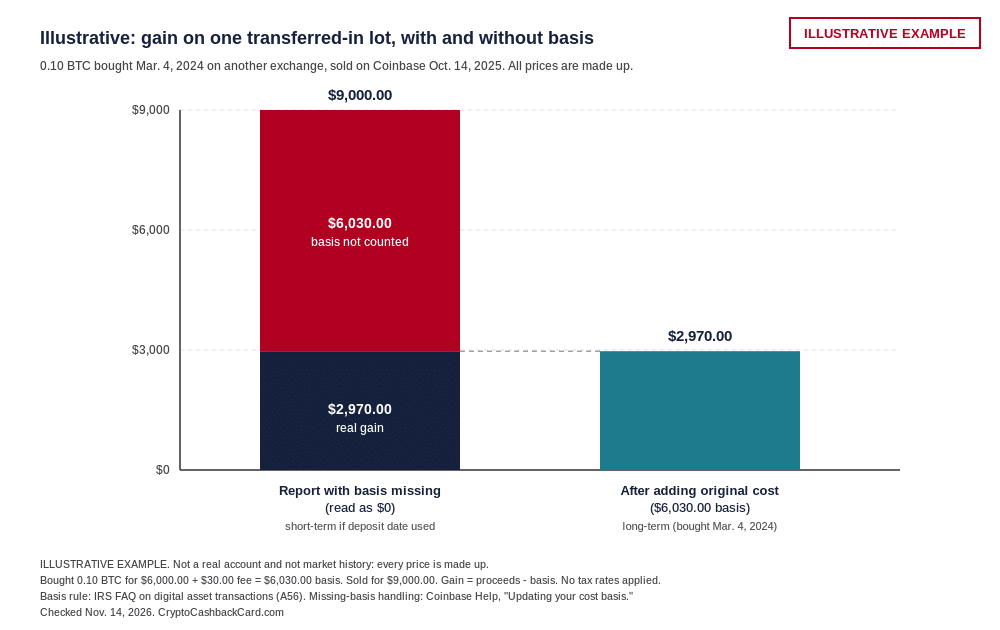
Every number below is made up. It shows how a missing basis inflates the gain. We apply no tax rates.
- Bought: 0.10 BTC on Mar. 4, 2024 on another exchange at $60,000 per BTC = $6,000.00, plus a $30.00 fee. Basis: $6,030.00 (basis includes the price plus transaction costs, IRS FAQ A56).
- Moved: to Coinbase on Jun. 10, 2025.
- Sold: on Coinbase on Oct. 14, 2025 at $90,000 per BTC = $9,000.00, no sale fee. The 1099-DA shows $9,000.00 proceeds and no basis.
| Basis missing, read as $0 | After adding the original cost | |
|---|---|---|
| Proceeds | $9,000.00 | $9,000.00 |
| Basis | $0.00 | $6,030.00 |
| Gain | $9,000.00 | $2,970.00 |
| Date acquired used | Jun. 10, 2025 (deposit date): short-term | Mar. 4, 2024 (actual): long-term |
| Form 8949 | Part I, box H (wrong here) | Part II, box K |
How it maps to Form 8949
Because the 1099-DA shows proceeds without basis reported to the IRS, the sale goes on Form 8949 with box H (held one year or less) or box K (more than a year) checked, and you enter your own basis in column (e). Here it is box K. This follows the 2025 Form 8949 instructions; check the 2026 form when it is published.
| (a) Description | (b) Acquired | (c) Sold | (d) Proceeds | (e) Basis | (f), (g) | (h) Gain |
|---|---|---|---|---|---|---|
| 0.10 BTC | 03/04/2024 | 10/14/2025 | 9,000.00 | 6,030.00 | blank | 2,970.00 |
Two cautions. Do not subtract a sale fee twice: check whether the 1099-DA proceeds are already net of fees. And if your Recipient Copy prints basis you added in Coinbase Taxes, that basis was not reported to the IRS; the Form 8949 instructions point to columns (f) and (g) for that case, so ask a preparer. For the box-by-box steps see our Form 8949 guide. If your corrected result is a loss, see our crypto tax-loss harvesting guide.
A simple spreadsheet for small volume
With a few lots and a few sales you can track basis yourself. This layout is illustrative; test the formulas on the sample row first.
Sheet “Lots” (row 1 = headers):
| A: Lot ID | B: Acquired | C: Units | D: Cost | E: Fees | F: Basis | G: Where from |
|---|---|---|---|---|---|---|
| L1 | 2024-03-04 | 0.10 | 6000 | 30 | =D2+E2 |
Other exchange |
Sheet “Disposals” (row 1 = headers):
| A: Sold | B: Units | C: Proceeds (1099-DA) | D: Lot ID | E: Acquired | F: Basis used | G: Gain | H: Term |
|---|---|---|---|---|---|---|---|
| 2025-10-14 | 0.10 | 9000 | L1 | =VLOOKUP(D2,Lots!A:G,2,FALSE) |
=VLOOKUP(D2,Lots!A:G,6,FALSE)*B2/VLOOKUP(D2,Lots!A:G,3,FALSE) |
=C2-F2 |
=IF(A2>EDATE(E2,12),"Long-term","Short-term") |
- Tie-out:
=SUM(C:C)on Disposals should equal the proceeds total on the 1099-DA. - Add fees once: purchase fees go in basis, sale fees reduce proceeds.
- When to stop: hundreds of lots, many wallets, DeFi or frequent transfers call for software.
Coinbase One Card and Coinbase Card in your report
- Coinbase One Card (credit) rewards: Coinbase says they are rebates, not taxable when received, and that any rise in value is taxable when you sell. That is Coinbase’s position, not an IRS ruling; we set out the rebate and income views in are crypto credit card rewards taxable. Each payout is its own lot: in the app, open the Credit card tab, then Balance, Rewards, See payouts, and save the date, amount and dollar value of each.
- Coinbase Card (debit): Coinbase says each time you use the card and sell crypto it is a taxable sale; spending USDC at par “should not result in a taxable gain or loss.” Statements include Coinbase Card activity.
- Not confirmed: whether One Card rewards appear in the raw CSV and with what basis. Compare your report with your payout list.
Sources: Coinbase Help: One Card rewards; Coinbase Help: Coinbase Card fees and taxes, checked Nov. 16, 2026. For non-tax card problems, see our Coinbase One Card gotchas guide.
What people said on Reddit in 2026 (anecdotes)
We read nine public r/Coinbase threads from 2026, a small search sample, not a poll. Paraphrased, no names. Five were about missing or “Unknown” basis after a transfer in, often with explainer replies saying that is expected for 2025 forms. In one (Mar. 20, 2026), a user whose form implied a gain said their real result was a loss and fixed it on Form 8949 with their own records. In another (Apr. 8, 2026), a user with $40k of proceeds and lost wallet records had no easy fix. Two threads were about forms that looked incomplete or listed wrong proceeds, which is a different problem: ask the issuer for a corrected form. Threads: Mar. 20; Apr. 8; wrong proceeds.
Do I need crypto tax software?
Not if you bought everything on Coinbase, never moved crypto in or out, and have few sales: Coinbase’s reports and a spreadsheet can work. Software earns its keep when you use several exchanges or wallets, move crypto around, or have many small lots. Check prices at your transaction count in our crypto tax software pricing guide.
What we could not confirm
- Whether your gain/loss report shows “Unknown” (current help page) or an assumed $0 (older Learn page) for transferred-in lots.
- The official CSV column list, and which export matches the headers the tools publish.
- The default cost-basis method for a retail account.
- How One Card rewards appear in the CSV, and the tax result of paying a One Card bill with crypto.
- Whether the 2026 Form 8949 keeps the 2025 box letters.
Sources
- Coinbase Help: Updating your cost basis; Cost-basis method; Form 1099-DA; Download your tax reports; Statements and gain/loss reports; Taxes for US customers; Form 1099-MISC; One Card rewards; Coinbase Card fees and taxes. Checked Nov. 16, 2026.
- Coinbase Learn and blog: Understanding estimated gains and losses (undated); Coinbase and CoinTracker, Feb. 10, 2026.
- IRS: Understanding your Form 1099-DA; Instructions for Form 1099-DA (2026); Instructions for Form 8949 (2025); FAQ on digital asset transactions; Instructions for Forms 1099-MISC and 1099-NEC. Checked Nov. 16, 2026.
- Third-party CSV documentation (secondary) and Reddit threads (anecdotes): linked in place above.
Disclaimer
This article is educational and is not tax, legal or financial advice. Coinbase and IRS pages change; we checked them on Nov. 16, 2026. The worked example and spreadsheet use made-up numbers, not a real account. Talk to a qualified tax professional before you file. CryptoCashbackCard is not affiliated with Coinbase or any exchange or card issuer named. Spot an error? Email hello@cryptocashbackcard.com and we will review it promptly.