
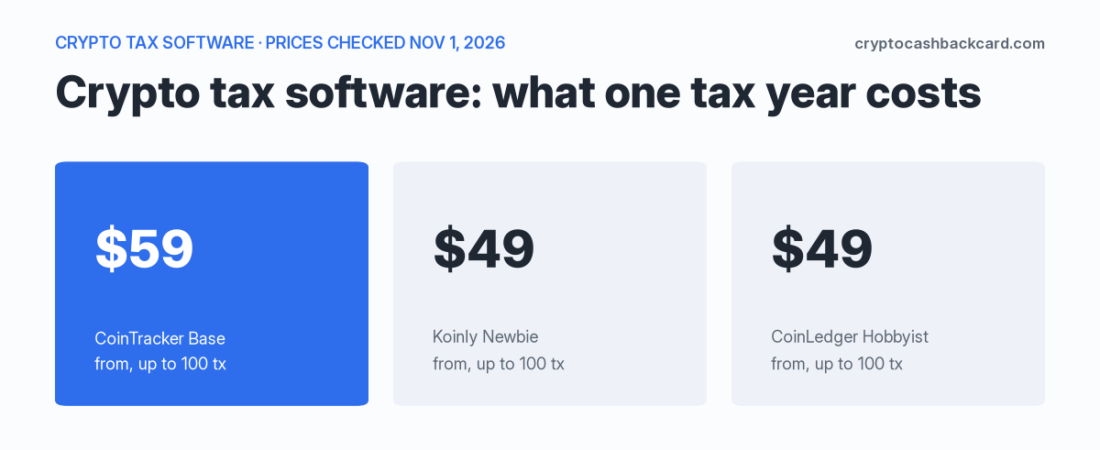
CoinTracker pricing, Koinly pricing and CoinLedger pricing all depend on one number: how many transactions the software counts in your account. Through 3,000 transactions, Koinly and CoinLedger list the same prices ($49, $99, $199). CoinTracker costs the same or more at every volume, but it counts fewer things as transactions and includes past years’ forms. This guide puts the three price lists in one dated table, then shows how each tool counts, so you can predict what you will really pay. Whether you are comparing crypto tax software for the first time or switching, start with your transaction count.
This page is general information, not tax advice. Talk to a qualified tax professional before you file. CryptoCashbackCard is an independent site and is not affiliated with CoinTracker, Koinly or CoinLedger. This page has no affiliate or referral links. We did not test these tools: every price and rule below comes from the vendors’ own pages (dated) and is labeled where it could not be confirmed.
Prices checked Nov 1, 2026. US users. Prices are list prices in USD, before promos, and vendors change them often. Confirm the in-app total before you pay. The 2025 filing season has passed: this page is useful for late or amended filers, filing several past years, and planning for tax year 2026.
The short answer
- Up to 100 transactions: Koinly $49, CoinLedger $49, CoinTracker $59.
- Up to 1,000: Koinly $99, CoinLedger $99, CoinTracker $199.
- Up to 3,000: Koinly $199, CoinLedger $199 (listed as “$199+”), CoinTracker $299 up to 2,500, then $499 (Ultra, up to 10,000).
- Around 10,000: CoinTracker $499. CoinLedger’s help page puts 10,000 or more in an Unlimited tier at $499. Koinly’s Pro plan (up to 10,000) is priced only in the app: check.
- The price is not the only difference. CoinTracker never counts spam, dust or card rebates (paid plans). Koinly counts across all your years, and stops working if you go over. CoinLedger sells each tax year separately.
- No free forms: all three have a free tier for importing and previewing. None gives you the tax forms for free.
- 1099-DA: none pulls it by API. All three have a separate step where you upload the PDF from each exchange.
CoinTracker pricing vs Koinly pricing vs CoinLedger pricing: cost at your volume
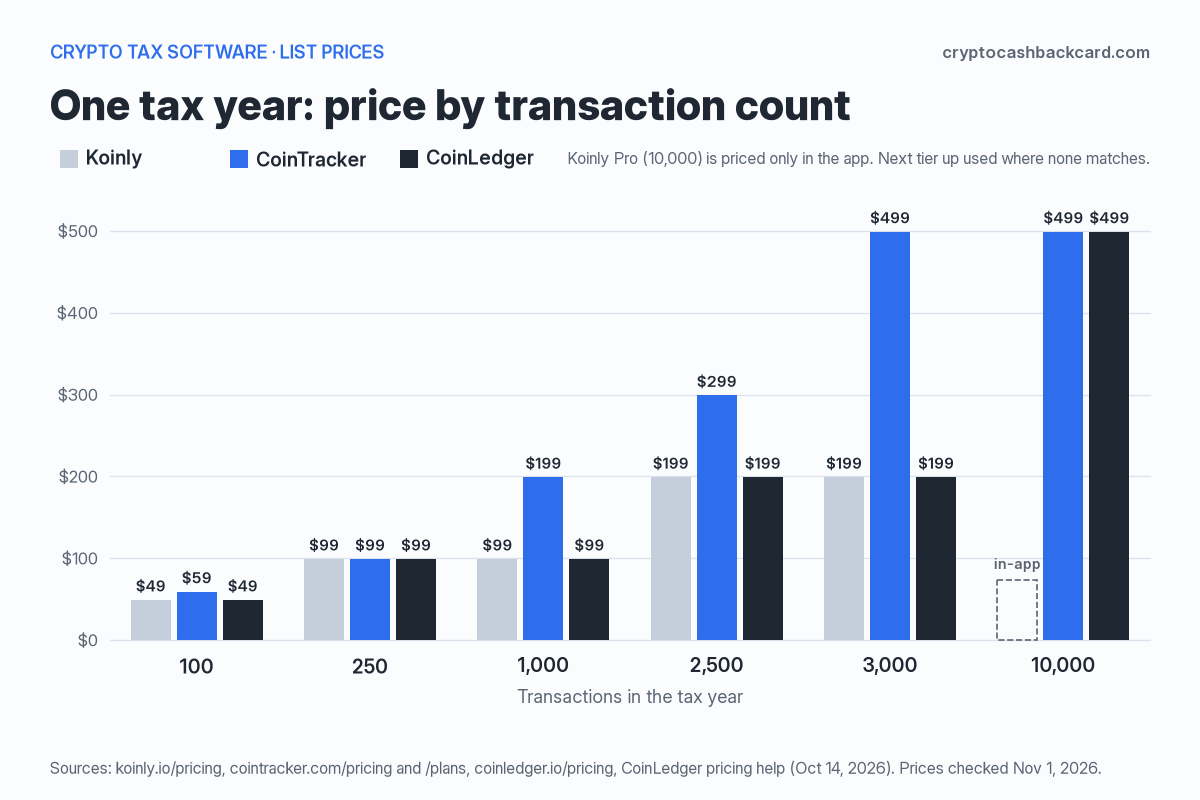
This is the price for one tax year at six transaction counts. “Check” means the vendor’s own pricing page does not show a price for that size.
| Transactions in the tax year | Koinly | CoinTracker | CoinLedger |
|---|---|---|---|
| 100 | $49 (Newbie) | $59 (Base) | $49 (Hobbyist) |
| 250 | $99 (Hodler; no 250 tier) | $99 (Base+) | $99 (Investor; no 250 tier) |
| 1,000 | $99 (Hodler) | $199 (Prime) | $99 (Investor) |
| 2,500 | $199 (Trader) | $299 (Prime+) | $199 (Pro) |
| 3,000 | $199 (Trader) | $499 (Ultra) | $199+ (Pro, “up to 3,000+”) |
| 10,000 | Check: Pro, priced in the app | $499 (Ultra) | $499 (Unlimited, 10,000 or more)* |
How the three are billed
- Koinly: a one-time purchase per tax year. “No subscription.” Koinly gives 7 days to ask for a refund if you have not generated a report.
- CoinTracker: an annual plan that auto-renews on your purchase date at your tier’s current price. You can turn off auto-renewal. Past years’ forms are included. Refund within 30 days if you have not downloaded any forms.
- CoinLedger: a one-time purchase per tax year, with a 14-day money-back promise. Each extra year is another purchase.
Third-party tables that list Koinly’s Trader plan at $179 or CoinTracker Ultra at $599 look out of date: the vendors’ own pages show $199 and $499. CoinTracker’s $59 Base price may be lower in your first year: CoinTracker says first-time filers with a simple year “pay an introductory rate” but does not publish it.
What counts as a transaction? How each tool counts
This is the part most price tables skip. Two people with the same wallet can pay different prices depending on which tool counts what.
| Koinly | CoinTracker | CoinLedger | |
|---|---|---|---|
| What the limit covers | The plan year and an account-wide limit across all years (first 1,000 earlier-year transactions are free margin) | Transactions in the tax year you are filing. Earlier years do not count. Lifetime cap 200,000 | Billable transactions in the tax year you buy |
| Spam and dust | Spam, deleted transactions and “the majority” of dust rewards are not counted | Spam and dust never counted | Spam: not named, unknown. Uncategorized transactions are not billable |
| Card and referral rebates | Not named: unknown | Not counted on paid plans | Not named. “Other crypto rewards” count; up to $25 of small payouts is deducted |
| Staking and interest | Not named: unknown | Base: first $25 of proceeds excluded. Prime and up: all excluded | Up to $25 combined excluded, at every tier |
| Transfers between your own wallets | “Groups related transactions” | Not stated: unknown | Transfers are billable; self-transfer deposits and withdrawals are not |
| Fees | Not named: unknown | Not stated: unknown | Billable (listed in its pricing help) |
| If you go over | Calculations, wallet syncs, CSV imports and report downloads stop, even for earlier years, until you upgrade or delete | You are asked to upgrade; you pay only the difference | You are prompted to upgrade; you pay only the difference. No downgrade |
Koinly’s account-wide limit
This is the rule that surprises people. Koinly says all the plans you buy combined must cover all transactions in your account, not just this year’s. If you had 1,000 transactions in 2023 and 1,000 in 2024, you can buy a Hodler plan for each year, or one Trader plan for 2024. The second route unlocks the 2024 report only. Koinly’s help calls the bigger plan “always cheaper.” At today’s list prices, the two routes are $198 (two Hodler plans at $99) and $199 (one Trader plan): a $1 difference the other way, by our arithmetic. The real difference is what you get: two reports, or one.
Koinly’s help still calls the one-bigger-plan route the cheaper one, so check both totals on its Plans page. If you go over, Koinly “halts” calculations, and you cannot sync wallets, import CSV files or generate reports “even for previous years.” The fix is to upgrade or delete the extra transactions. One Koinly forum user reported sync trouble in February 2026 after passing a 1,000-transaction plan.
Do you pay again for past years?
- CoinTracker: its pricing page says Form 8949 and Schedule D “for this year and every past year” are included on paid plans. Its FAQ says catching up on several years costs the same as filing only this year; how an older year with more transactions than your plan limit is handled is not stated.
- Koinly: you need a plan for each year you want a report for. Older years can be covered by a bigger current plan, but then you cannot generate those years’ reports.
- CoinLedger: each tax year is a separate purchase. Each year is priced on that year’s billable transactions, and there are no downgrades.
Illustrative example, not a quote: three unfiled years, 80 transactions each. Koinly: $49 x 3 = $147. CoinLedger: $49 x 3 = $147. CoinTracker: one Base plan at $59, if the per-year limit works as its page describes. If your older years are small, CoinTracker’s all-years model can be the cheapest. If you only need one year, it is usually the dearest at the same volume.
Koinly vs CoinTracker vs CoinLedger: which is cheapest for you?
- One year, under 3,000 transactions: Koinly and CoinLedger tie on list price at every size we could check. Choose on which one reconciles your wallets with the least cleanup (see the free-tier tip below).
- Several unfiled years: price the CoinTracker all-years model against buying each year with Koinly or CoinLedger.
- Lots of rewards, rebates, spam or staking: CoinTracker excludes more of these from the count, so it may need a lower tier than the raw number of rows suggests. Koinly excludes spam and most dust. CoinLedger deducts up to $25.
- Years of old history, even with few trades this year: Koinly’s account-wide limit can push you up a tier. Check the count before you buy.
- Above 3,000: the three price lists are not directly comparable from public pages. Get the in-app total from each.
The cheapest way to find out is to import your history into each free tier and read its usage count before you pay.
CoinTracker free, Koinly free, CoinLedger free: what you get without paying
- CoinTracker Free ($0): portfolio tracking, a tax summary, self-serve support and “No downloadable tax forms.” Each wallet can hold up to 50,000 transactions. Staking counts toward the limit on Free.
- Koinly Free: import unlimited wallets and up to 10,000 transactions, see gains and the tax summary. You “can’t generate any reports.” Past 10,000 on Free, calculations halt.
- CoinLedger: free portfolio tracking and imports; downloadable tax reports need a paid plan.
So there is no free option among these three that gives you the forms. We did not check other “free crypto tax software” or “cheapest crypto tax software” pages. The big head-to-head lists are a different article.
Crypto tax software and your 1099-DA
The API or CSV import pulls your history. The 1099-DA your exchange sends is a PDF, and it is a separate step. For tax year 2025 many 1099-DAs show proceeds only, so the software’s job is to supply cost basis and reconcile the two. The IRS says you must report your crypto activity whether or not you get a form.
| How the 1099-DA gets in | What it does with it | |
|---|---|---|
| Koinly | Upload the PDF for each exchange in the “1099-DA Forms” section of the Tax Reports page, or click “Not received” | Needed before you download Form 8949, Schedule D or the TurboTax export; otherwise some reports come out empty. Fills in the 8949 boxes. Koinly warns of small gaps, for example in how fees are treated |
| CoinTracker | Upload the PDF (under 20 MB) per exchange in the 1099-DA portal, part of the guided tax flow | Reads the numbers, compares them side by side with its own, and lets you proceed as-is, adjust proceeds or review transactions. You can skip the step, but CoinTracker does not recommend it. “1099-DA reconciliation” is on paid plans, not Free |
| CoinLedger | Upload each exchange’s PDF in the 1099-DA Dashboard | “View Matches” compares the exchange’s figures with CoinLedger’s, sale by sale, and flags each one as matched, a proceeds gap or missing on one side. When you build Form 8949 you can ignore the 1099-DA, use CoinLedger’s figures, or use the 1099-DA proceeds. Which plan includes the dashboard: not stated |
Crypto tax software for Coinbase and other exchanges
The upload step is the same whichever exchange issued the form. Coinbase and Crypto.com forms have the same problem: proceeds without your full basis. For the Coinbase side, see our Coinbase taxes guide. For Crypto.com’s forms and what they leave out, see our Crypto.com tax forms guide.
Handing off to your tax return
All three produce Form 8949 on paid plans (see how Form 8949 works) and export to tax software:
- CoinTracker: TurboTax and H&R Block integrations (H&R Block says you can import CoinTracker data into its Premium Online product).
- Koinly: pricing page lists export to TurboTax and TaxACT. H&R Block: not stated on the Koinly pages we read.
- CoinLedger: TurboTax, TaxACT, H&R Block Desktop and TaxSlayer, per its pricing page.
Whichever you use, check your 8949 totals against each 1099-DA before you file. A mismatch can have several causes: Koinly names fee treatment on crypto-to-crypto trades as one known cause.
Do card cashback and rebates count as transactions?
Crypto card cashback arrives as many small deposits, and each one can count toward your limit. Only CoinTracker says plainly what happens: card and referral rebates “don’t count toward your limit on any paid plan.” Koinly and CoinLedger do not name card cashback in the rules we read. Koinly has a “Cashback” tag, but its help page describes what the tag does to a deposit’s treatment and says nothing about counting. CoinLedger counts income as billable and deducts up to $25 of micro-transactions. If you earn cashback every day, import it into each free tier first and read the count.
The tax side is a separate question. For how card rewards are treated, see are crypto credit card rewards taxable. If you are still choosing a card, see our best crypto cashback cards guide.
Best crypto tax software on Reddit: what people said in 2026
We read five public r/CryptoTax threads (Jan. to Apr. 2026). That is a small sample found by search, not a poll. We did not find readable r/koinly threads from 2026 on this topic, so that subreddit is not covered. CoinTracker, Summ and other vendor staff post in these threads: we do not count their comments as user reports. We paraphrase and quote no one.
| What people asked or said | When | What it tells you |
|---|---|---|
| Which tool do people use long-term and why. Koinly got praise for easy reconciliation; one reply said prices “add up fast.” | Jan. 22, 2026 | Price grows with volume. Reconciliation is what people value. |
| Which tool is up to date for the new IRS rules. Users named Koinly, CoinLedger and Summ; one Coinbase-only user said they were moving from CoinLedger to CoinTracker for integrations. | Feb. 13, 2026 | The 1099-DA made people re-shop. Exchange mix matters. |
| CoinLedger or Koinly? Of 10 readable user replies, 9 chose Koinly and 1 chose CoinLedger. One high-volume user said other tools get pricier as transactions pile up. One reply called CoinLedger “pricier,” which does not match the list prices (they tie through 3,000). | Mar. 28-29, 2026 | Anecdote only: popularity is not price. Check the list price yourself. |
| A Coinbase and DeFi user said CoinLedger would not take their 1099-DA PDF, and TurboTax showed 400+ issues. Replies disagreed on whether to upload both forms. | About Apr. 2026 (date inferred) | The 1099-DA step is where people get stuck. Follow each vendor’s own guide. |
| Solana DeFi: a commenter said some tools split one transaction into several. Excerpt only. | About Jan. 2026 (date inferred) | Unrecognized DeFi activity can inflate a count and a price. |
The common advice in these threads and in vendor guides: try the free tiers, add all your wallets and exchanges, and see which tool matches your transfers with the least cleanup. We agree, with one rule: do not buy until the transaction count looks right.
CoinTracker review, Koinly review, CoinLedger review: what this page is
This is not a hands-on review. We did not test accuracy, support or any import. We compared published prices, counting rules and 1099-DA steps. For how well each tool handles your wallets, the free tiers are the test.
What we could not confirm
- The price of CoinTracker’s 50,000-transaction Ultra+ option is not on its public pages.
- Koinly Pro (up to 10,000 transactions) and its extra 1,000-transaction packs are priced only in the app.
- CoinLedger’s tiers between 3,000 and 10,000 are shown only in the app. A CryptoSlate review (Oct. 2026) saw a $299.99 tier in the app; we could not confirm it.
- Whether Koinly or CoinLedger count card cashback, and whether CoinLedger counts spam. CoinLedger’s pricing page lists micro-transactions as “100 Trades” while its help page says up to $25 worth.
- How CoinTracker handles an older year with more transactions than your plan limit.
- Which CoinLedger plan includes the 1099-DA Dashboard.
FAQ
Is there free crypto tax software that gives forms?
Not among these three. CoinTracker Free has “no downloadable tax forms.” Koinly Free cannot “generate any reports.” CoinLedger’s downloadable reports need a paid plan. All three let you import and preview first.
Do card rewards count as transactions?
CoinTracker says card and referral rebates do not count on paid plans. Koinly and CoinLedger do not say in the pages we read. Import your cashback into the free tier and look at the count.
What happens if I go over my limit?
On Koinly, calculations, syncing, CSV import and report downloads stop until you upgrade or delete transactions. On CoinTracker and CoinLedger you upgrade and pay the difference between plans.
Do I pay again for past years?
CoinTracker includes past years’ forms on paid plans. Koinly and CoinLedger sell each tax year separately.
Does the software import my 1099-DA?
Not by API. Your history imports by API or CSV. The 1099-DA is a PDF you upload for each exchange in a separate step, and the tool compares it with its own numbers.
Koinly vs CoinTracker vs CoinLedger: which is cheapest for me?
Under 3,000 transactions in one year, Koinly and CoinLedger tie on list price and CoinTracker costs the same or more. With many past years, rewards, rebates or spam, CoinTracker’s counting can change the answer. Use the table and test your count in each free tier.
Read next
Crypto tax-loss harvesting and the wash-sale rule
Software tracks your lots; here is how to use them to harvest a loss.
Form 8949 when your 1099-DA has no cost basis
How to fill boxes H and K and match your records to a proceeds-only form.
Coinbase taxes: forms and reports
What Coinbase sends, where to find it and what to upload.
Are crypto card rewards taxable?
The rebate and income views on card cashback.
Sources
- CoinTracker pricing; CoinTracker plans page; plans and features; how transactions impact your plan; 1099-DA portal. All checked Nov. 1, 2026.
- Koinly pricing; tax plans (June 23, 2026); how pricing works (June 23, 2026); uploading 1099-DA forms (July 2, 2026); tags. Checked Nov. 1, 2026.
- CoinLedger pricing; pricing questions answered; 1099-DA Dashboard. Checked Nov. 1, 2026.
- CryptoSlate: CoinLedger review, secondary, used only for the unconfirmed in-app tier.
- H&R Block: CoinTracker integration.
- IRS: Understanding your Form 1099-DA (reviewed June 28, 2026).
- Reddit r/CryptoTax threads: Jan. 22, 2026, Feb. 13, 2026, Mar. 28, 2026, about Apr. 2026, about Jan. 2026; Koinly forum, Feb. 20, 2026.
Disclaimer
This article is educational and is not tax, legal or financial advice. Prices and rules change; check each vendor’s current page before you buy. Tax treatment depends on your facts. Talk to a qualified tax professional. CryptoCashbackCard is not affiliated with CoinTracker, Koinly, CoinLedger or any exchange. Author: CryptoCashbackCard.
Spot an error? Email us at hello@cryptocashbackcard.com and we will review it promptly.