
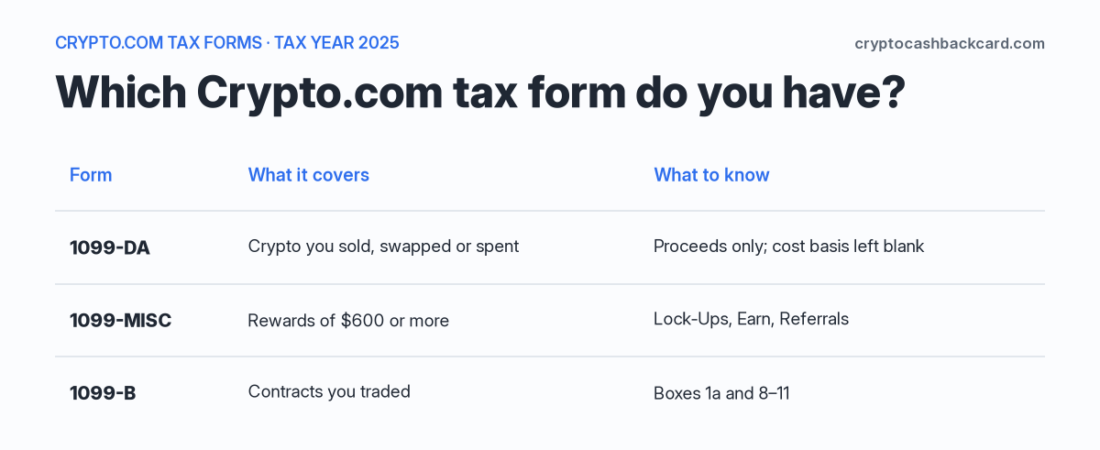
Crypto.com tax forms for US customers come in up to three types. Form 1099-DA covers crypto you sold, swapped or spent. Form 1099-MISC covers rewards of $600 or more (tax year 2025). Form 1099-B covers contracts you traded. Crypto.com emails each one as a download link. For tax year 2025, the 1099-DA shows proceeds only: Crypto.com says it chose not to report cost basis. This guide shows which form you probably have, where to find it, and what none of the forms tell you.
This page is general information, not tax advice. Tax treatment depends on your facts, so talk to a qualified tax professional before you file. CryptoCashbackCard is an independent site, not affiliated with Crypto.com. This page has no affiliate or referral links.
Last updated Nov. 1, 2026. Which tax year is this? This guide is for US users. Tax year 2025 (forms Crypto.com issued in early 2026): the first 1099-DA, proceeds only. If you are filing late or amending, this is your year. Tax year 2026 (forms due in early 2027): brokers must report cost basis for some assets. See the 2026 section below. Crypto.com has not published a 2026 form page yet.
The short answer
- Sold, swapped or converted crypto? Look for a Form 1099-DA. It shows what you received (proceeds, net of fees), not your profit.
- Earned $600 or more in rewards in 2025 from Lock-Ups, Earn, Referrals or “certain other activities”? Look for a Form 1099-MISC.
- Traded contracts? Look for a Form 1099-B. Crypto.com does not say whether its prediction contracts are included. See the table below.
- Cannot find your form? Search your email for no-reply@crypto.com, check spam, then ask In-App Chat. Some users in 2026 were sent to a direct link by support.
- Cost basis blank? That is expected for 2025. It does not mean your basis is zero. You fill it in from your own records.
- No form at all? You still report. The IRS says you must report taxable crypto activity “regardless of the amount or whether you receive a payee statement or information return.”
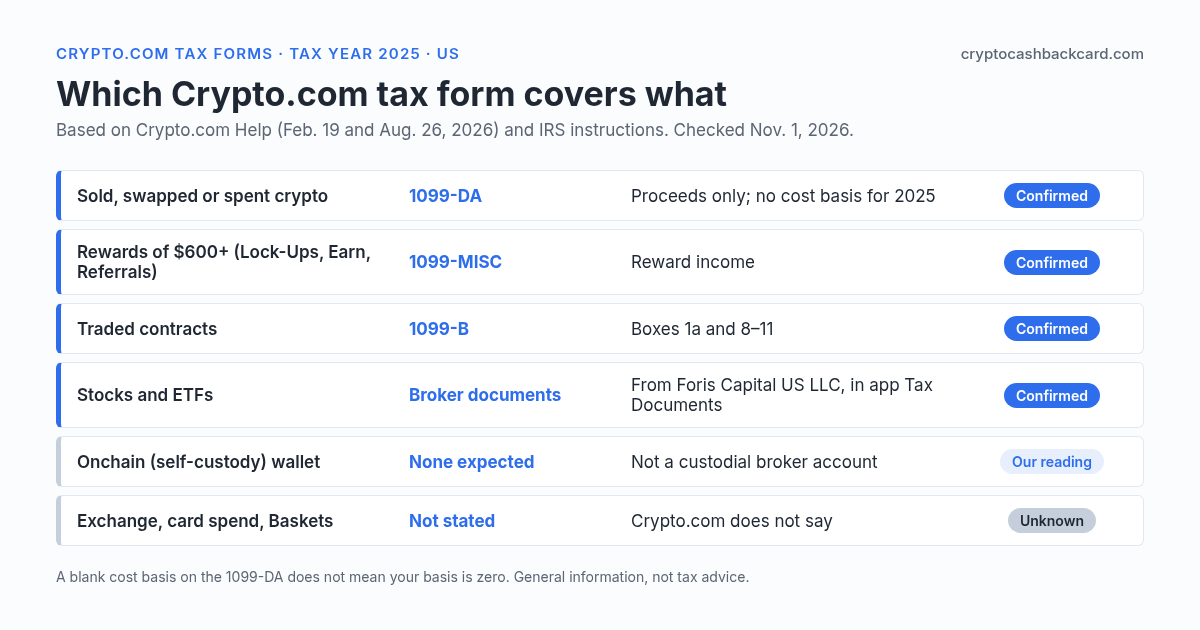
Crypto.com taxes at a glance: which form covers what
| What you did | Form | What is on it | What is missing or unclear |
|---|---|---|---|
| Sold, swapped or converted crypto in the Crypto.com App | 1099-DA | Asset, units, date sold, proceeds (net of fees) | Cost basis (tax year 2025). Date acquired is not on Crypto.com’s box list. |
| Earned rewards from Lock-Ups, Earn, Referrals or “certain other activities” (US$600+ for 2025) | 1099-MISC | Total reward income for the year | Rewards under the threshold are still taxable. Crypto.com does not name staking, Visa card rewards or CRO rewards on its page. |
| Traded futures or options contracts | 1099-B | Profit or loss on closed and open contracts (boxes 8 to 11) | The Help page does not mention prediction contracts. See the UpDown note below. |
| Stocks and ETFs in the app | Separate broker documents | Issued by Foris Capital US LLC, a separate broker-dealer | In the app: Settings, Account, Tax Documents Statement. |
| Crypto.com Exchange account | Not stated | – | Crypto.com does not say whether Exchange activity is on the 1099-DA. Export your Exchange history either way. |
| Onchain (self-custody) wallet | No Crypto.com form expected | – | Crypto.com does not hold your keys. You track this from public chain records. |
| Visa card spend, Crypto Baskets | Not stated | – | Crypto.com does not say how these appear. Ask In-App Chat and keep your own exports. |
Crypto.com tax forms: where to find them (your Crypto.com 1099 and other tax documents)
Crypto.com’s Help page gives two ways to get a form. There is no tax center path on that page.
- Check your email. Crypto.com says it emails a download link from no-reply@crypto.com to the latest address on your account. Check spam and junk.
- Ask In-App Chat. Chat is Crypto.com’s route for a paper copy, a missing form, or a form that looks wrong.
- Know the direct link users were given. Crypto.com runs a 1099 page at crypto.com/1099form. It asks for your email and Social Security number to verify you, and says the feature is provided by a third party, Sovos Compliance, LLC. Several Reddit users said support sent them there in February 2026. Type the address yourself rather than clicking a link in a message.
- Stocks and ETFs are separate. If you trade stocks in the app, those tax documents are issued by Foris Capital US LLC. Open Settings, then Account, then Tax Documents Statement.
A safety note. In our Reddit sample, one user doubted the download email because it came from a different Crypto.com sub-domain than the one on the Help page, and several did not like being asked for an email address and SSN to download. We could not confirm either point from Crypto.com. If an email worries you, do not click it. Open In-App Chat and ask for the link there.
The 1099-B for prediction contracts may come from a different sender
One user on r/Crypto_com (Feb. 18 to 19, 2026) said Crypto.com support told them their 2025 1099-B for UpDown contracts is issued by another service and sent by email from edelivery@viewmyforms.com. That is one report, not a Crypto.com statement. A customer notice from Nadex (now Crypto.com’s derivatives exchange, CDNA) says its 2025 1099-B goes out by secure email, but it does not name a sender. If you traded prediction contracts and have no 1099-B, ask In-App Chat. Crypto.com’s own 1099-B page says it is your job to decide how the form applies to your return.
What is on the Crypto.com 1099-DA (and what is not)
| Box | What Crypto.com says it shows |
|---|---|
| 1a | Digital asset code (DTIF code) |
| 1b | Name of the digital asset |
| 1c | Number of units sold, exchanged or otherwise disposed of |
| 1e | Date sold or disposed. May be blank when the form reports the year’s aggregate of stablecoins |
| 1f | Proceeds: the USD value of what you disposed of, minus the fees |
The Help page says: “Cost basis is not required to be reported on form 1099-DA this year, and we’ve chosen not to report cost basis information during this transitional period to avoid any unintended error.” Two things follow.
- Proceeds are not profit. The form adds up what you received. Your gain or loss is proceeds minus your cost basis.
- Anything you moved in from another exchange or wallet has no basis on Crypto.com’s records. Even from tax year 2026 on, that crypto is “noncovered” under IRS rules (see below). Same blank-basis problem as on Coinbase: see our Coinbase taxes guide.
The IRS tells you what to do with a wrong form: ask the issuer for a corrected one. “Don’t contact the IRS. We can’t correct your Form 1099-DA.” It also says not to wait to file. The IRS says that for 2025 the form requirements “generally apply to U.S. brokers,” so users of non-US exchanges may not get a 1099-DA but still have to report (IRS: Understanding your Form 1099-DA).
Whose name is on it? Two Reddit users said the payer on their form was Foris DAX, Inc., not “Crypto.com.” That fits: Crypto.com’s US terms say the App is provided by Foris DAX, Inc., a Delaware corporation (Foris Services, Inc. for Louisiana customers). We have not seen a form ourselves, so the exact payer name on yours may differ.
Crypto.com tax forms on Reddit: what people reported in 2026
We read eight public Reddit threads about Crypto.com forms (r/Crypto_com and r/CryptoTax, Feb. to Apr. 2026). That is a small sample found by search, not a poll. Counts below are threads, not people, and dates are from comment timestamps where shown. We paraphrase and quote no one.
| What people ran into | Threads | When | What is going on |
|---|---|---|---|
| Form late, no email, or only available through support or a direct link | 4 | Feb. 2026 (comments dated Feb. 18-19 in one thread) | Crypto.com’s Help page gives no delivery date. Use email, then In-App Chat. |
| Separate 1099-B for UpDown/prediction contracts, sent by a different service | 1 | Feb. 18-19, 2026 | One report. Not on Crypto.com’s Help page. |
| “1099-DA Combined” with all proceeds under “Unknown Term” | 2 | Mar. 2026; Apr. 7, 2026 | See below. |
| 1099-DA proceeds do not match Koinly or other tax software | 3 | Mar. 2026; Mar. 31, 2026; Apr. 7, 2026 | Usually transfers between your own wallets read as sales. See the worked example. |
| Crypto Baskets confusing the numbers | 1 | Mar. 31, 2026 | One report. How baskets appear on the form is unknown. |
| App vs Exchange vs DeFi wallet: which one is on the form? | 0 settled it | – | No thread settled it. Third-party guides contradict each other, and Crypto.com’s page is silent. |
What does “Unknown Term” mean?
Crypto.com does not explain the label. The 1099-DA has a short-term or long-term field. The IRS instructions for brokers include a code for when a broker cannot tell short-term from long-term because it does not know the holding period (code Y in the form’s “Applicable checkbox on Form 8949” field). That fits an account where you moved crypto in from somewhere else, but it is our reading, not Crypto.com’s statement. What to do: work out the holding period from your own purchase date and put each sale in Part I (short-term) or Part II (long-term) of Form 8949.
Worked example: 1099-DA vs Form 8949 (illustrative numbers)
These numbers are made up to show the mechanics. They are not from any real account. For the step-by-step form instructions, see our Form 8949 guide.
The setup. In March 2024 you bought some bitcoin for $4,000 on another exchange. You moved it to Crypto.com. In July 2025 you sold it for $6,500. You also swapped some ETH for USDC ($1,200 proceeds), and you moved $900 of crypto from Crypto.com to your own cold wallet.
| Line | Crypto.com 1099-DA | Your tax software (transfer not matched) | Your records |
|---|---|---|---|
| Bitcoin sale: proceeds | $6,500 | $6,500 | $6,500 |
| Bitcoin sale: cost basis | Blank (not reported) | $0 (software default) | $4,000 |
| ETH to USDC swap: proceeds | $1,200 | $1,200 | $1,200 |
| Transfer of $900 to your own wallet | Not a sale (no line) | $900 read as a sale | Not a sale |
| Total proceeds | $7,700 | $8,600 | $7,700 |
The two traps.
- Zero-basis trap. If you leave basis blank or let software use $0, the bitcoin looks like a $6,500 gain. With your real $4,000 basis the gain is $2,500, and it is long-term because you held it for more than a year. The blank basis would overstate your gain by $4,000.
- Proceeds-mismatch trap. The software shows $900 more proceeds than the form because it read your wallet transfer as a sale. The IRS gets the 1099-DA, so your return should tie to it. Fix the transfer in the software, so the totals match at $7,700.
How it lands on Form 8949. The IRS says to report the proceeds shown on the 1099-DA in column (d). Put the bitcoin sale in Part II. Because Crypto.com reported no basis, use box K (long-term, basis not reported to the IRS), and enter your own $4,000 in column (e). Box H is the short-term version. If you got no 1099-DA for a sale, use box I (short-term) or L (long-term). Use boxes G to L for digital assets, not C or F. Adjustments go in column (g) (IRS: Instructions for Form 8949). Ask a tax professional how to treat any leftover differences.
A reconciliation checklist.
- Save every Crypto.com form, and export your history (App token wallet, cash wallet and card; plus the Exchange if you used it).
- List each 1099-DA line and the box 1f total.
- Compare that total to your software’s proceeds. A big gap usually means unmatched transfers.
- Add basis and real purchase dates from your own records for anything moved in.
- Pick box H or K for sales on the 1099-DA, and I or L for sales with no form.
- Keep your reconciliation notes. They are your proof if the IRS matches your return against the form.
What changes for tax year 2026 (forms issued in early 2027)
- Basis reporting starts, for some assets. The IRS requires brokers to report cost basis for covered assets: crypto acquired after 2025 in an account where the broker held custody, and kept there until sold.
- Still your job: anything bought before 2026, and anything transferred in from another exchange or wallet. The IRS calls those “noncovered.” A broker may report basis for them voluntarily and flags them with box 9.
- Optional stablecoin and NFT rules. A broker can skip reporting some qualifying stablecoin sales if your total proceeds are $10,000 or less for the year, and some specified NFT sales at $600 or less. Whether Crypto.com uses these options is unknown.
- The 1099-MISC threshold changes. The IRS says the $600 reporting level rises to $2,000 for payments made after Dec. 31, 2025. Crypto.com’s page covers tax year 2025 only, so its 2026 threshold is unknown. Under the threshold, rewards are still taxable.
- Unknown for Crypto.com: delivery dates, how its basis reporting for covered assets will look (the IRS makes it mandatory), and whether moving crypto from its App to its Exchange counts as “transferred in.”
Sources: IRS: Instructions for Form 1099-DA, IRS: Instructions for Forms 1099-MISC and 1099-NEC. The IRS “About Form 1099-MISC” page still shows $600, which can confuse readers.
Rewards and 1099-MISC: what it covers
Crypto.com’s page says a 1099-MISC is possible for $600 or more in rewards from Lock-Ups, Earn, Referrals and “certain other activities.” It does not name staking, Visa card rewards or CRO rewards, so we cannot tell you those appear on it. The IRS says brokers do not report rewards and staking payments on the 1099-DA. The 1099-DA is for sales only. A reward you were paid is income; selling it later is a separate sale.
Card cashback taxable? CRO rewards taxes in short
Crypto.com’s US credit card page says rewards come in your choice of BTC or CRO. Whether cashback counts as a rebate (not income when received) or income is not settled by the IRS. We explain both views in our pillar guide: Are crypto credit card rewards taxable? A few short points for this page:
- Selling or spending the reward crypto later is a disposal, so it can show on a 1099-DA.
- If a card or payment feature spends your crypto balance directly, that spend can be a disposal too. The IRS lists disposals “in exchange or trade for property, goods or services in any amount” among the transactions that bring a 1099-DA (IRS). How Crypto.com reports card spend is not stated.
- Whether card rewards are on a Crypto.com 1099-MISC is unknown. Keep your own reward export. If you want to compare cards, see our best crypto cashback cards page.
Crypto.com tax report and tax calculator: what happened to Crypto.com Tax
Some guides still tell you to use the free Crypto.com Tax tool at tax.crypto.com. Crypto.com’s own tax site now says: “Crypto.com Tax has been deprecated as of 24 June, 2024. Past reports generated on the legacy Crypto.com Tax tool are no longer applicable.” It sends users to third-party tax services and tells them to export their transaction history from the App and the Exchange. We do not recommend the old tool.
What to use instead for a Crypto.com tax report: export your own history. In the App, the Help Center says you can export CSV files for the token wallet, the cash wallet and the Visa card (Accounts, History icon, Export). Each report covers up to three years, and downloads stay available for 30 days. The Exchange has its own export. Those files are raw data, not a finished tax report. Sources: Crypto.com Help: export (App), tax.crypto.com.
What we could not confirm
- Which Crypto.com products (App, Exchange, Visa card, Crypto Baskets) feed the 1099-DA. Crypto.com’s page does not say, and guides disagree.
- Whether prediction contracts are on the 1099-B, and which service sends it. We have one user report only.
- Whether Visa card rewards, CRO rewards or staking appear on the 1099-MISC.
- What “Unknown Term” means to Crypto.com. We have an IRS code that fits, not an official answer.
- The exact payer name printed on the form. Foris DAX, Inc. is reported by users and matches Crypto.com’s US terms.
- Crypto.com’s tax year 2026 plans: delivery dates, 1099-MISC threshold, basis reporting, stablecoin and NFT options.
- An in-app “Tax Center” path for crypto forms. Guides give three different paths and none is on Crypto.com’s Help page, so we do not list one.
FAQ
I did not receive a Crypto.com tax form. What do I do?
Search your email for no-reply@crypto.com and check spam. If it is not there, ask In-App Chat for the form or for a paper copy. Crypto.com says it “may be required” to issue each form, so not every user gets every form. You still have to report taxable activity.
Do I have to report my Crypto.com crypto if I got no form?
Yes. The IRS says to report income, gain or loss from all taxable digital asset transactions regardless of the amount or whether you receive a form. Do not wait for a form to file.
Why is cost basis blank on my Crypto.com 1099-DA?
For tax year 2025, Crypto.com says it chose not to report cost basis. Blank does not mean zero. Use your own records for basis on Form 8949.
What does “Unknown Term” mean on my 1099-DA?
Crypto.com has not explained it. It likely means the form could not label the sale short-term or long-term. Work out the holding period from your own records.
Why do my 1099-DA numbers not match my tax software?
The most common cause in the threads we read is a transfer between your own wallets that the software read as a sale. Import both sides of every transfer so it is matched. Small gaps can also come from how fees and valuations are handled. Your return should tie to the form’s proceeds, so ask a tax professional about any gap that is left.
Are Crypto.com taxes different on the Exchange or Onchain wallet?
The rules for taxable events are the same. What differs is the paperwork. Crypto.com does not say whether Exchange activity is on the 1099-DA. The Onchain wallet is self-custody, so you track it yourself from public chain records.
Is there still a Crypto.com tax calculator?
No. Crypto.com says its Crypto.com Tax tool was deprecated on 24 June 2024. Export your transaction history instead, and use tax software or a professional. For what CoinTracker, Koinly and CoinLedger cost at your transaction count, see our crypto tax software pricing comparison.
Is card cashback taxable? What about CRO rewards?
It is not settled. Some treat spending cashback as a rebate, others as income when received. Our card rewards tax guide (linked above) covers both views. Selling or spending the crypto later is a separate taxable event.
Can I use TurboTax for my Crypto.com tax return?
We could not confirm how TurboTax handles a Crypto.com 1099-DA directly. In the Reddit threads we read (Mar. 2026), users imported a Form 8949 made by crypto tax software into TurboTax; one said TurboTax Online then asked them to review hundreds of lines. Whatever tool you use, your reported proceeds should tie to the 1099-DA. Ask a tax professional if they do not.
What tax documents do I need to give my tax preparer?
Every Crypto.com form you got (1099-DA, 1099-MISC, 1099-B), your exported transaction history from every Crypto.com product you used, and basis records for anything you moved in.
Read next
Form 8949 when your 1099-DA has no cost basis
How to fill boxes H and K and match your own records to a proceeds-only form.
Coinbase taxes: forms and reports
What Coinbase sends, where to find it and how it differs from Crypto.com.
Are crypto card rewards taxable?
The rebate and income views on card cashback, and what pending bills would change.
Sources
- Crypto.com Help: 1099 Form for the 2025 Tax Year (Feb. 19, 2026)
- Crypto.com Tax (deprecation notice)
- Crypto.com: 1099 Form (identity check, Sovos Compliance)
- Crypto.com App and Web U.S. Terms & Conditions (Feb. 26, 2026)
- Crypto.com Help: export transaction history (App)
- Crypto.com Help: Stocks and ETFs (tax documents)
- Crypto.com: Visa Signature credit card
- IRS: Understanding your Form 1099-DA
- IRS: Digital assets
- IRS: Instructions for Form 1099-DA
- IRS: Instructions for Form 8949
- IRS: Frequently asked questions on digital asset transactions (Q108)
- IRS: Instructions for Forms 1099-MISC and 1099-NEC
- Public Reddit threads on r/Crypto_com and r/CryptoTax, Feb. to Apr. 2026 (paraphrased; no usernames)
Disclaimer
This page is general educational information, not tax, legal or financial advice. Tax rules depend on your individual facts and can change. Crypto.com’s help pages and the IRS pages were checked on Nov. 1, 2026 and may have changed since. Reddit reports are anecdotes from individual users and are not confirmed by Crypto.com. Talk to a qualified tax professional before you make decisions or file a return. CryptoCashbackCard is an independent site, not affiliated with or endorsed by Crypto.com or any card issuer. This page has no affiliate or referral links.
Spot an error or have a concern about this page? Email us at hello@cryptocashbackcard.com and we will review it promptly.